The Total Cost of Owning an On-Premise AI Server
A line-by-line, three-year budget for an on-premise AI server, with a worked example where the hardware invoice is only about 40 percent of the cost to own.
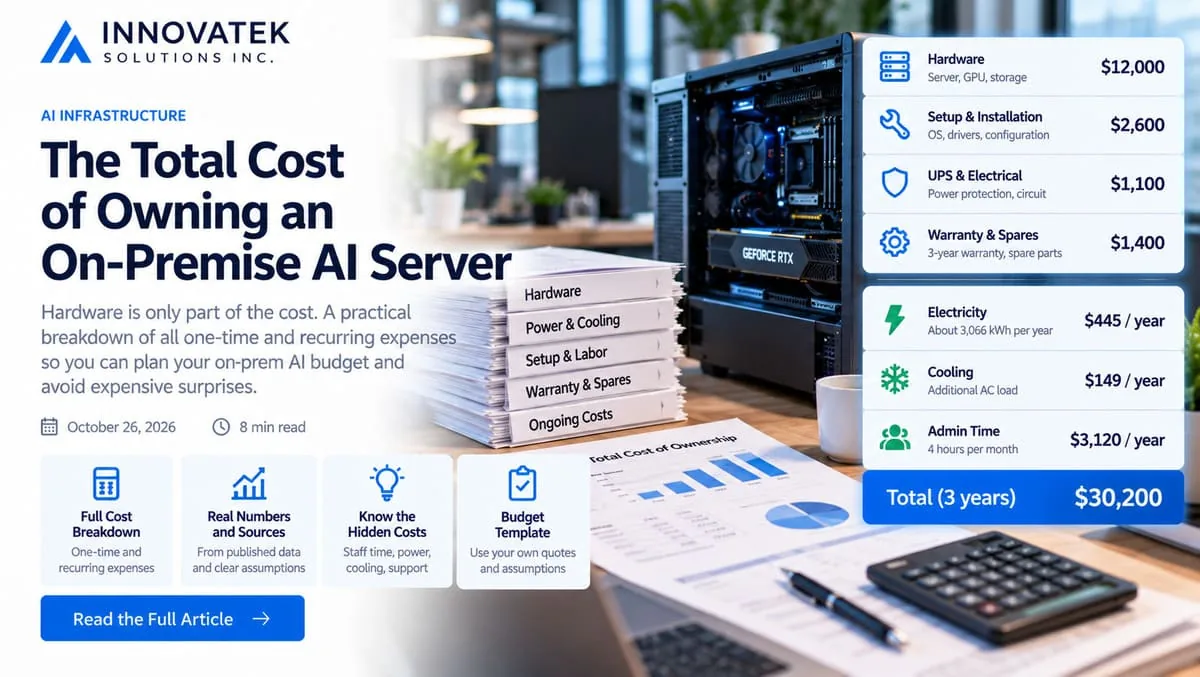
Take a $12,000 AI server quote. Over three years, with electricity, cooling, a few hours of admin each month, an OS support subscription, spares, a UPS and an extended warranty, the same machine costs about $30,200 to own. The invoice is roughly 40 percent of the total. The largest line after the hardware is not power. It is staff time. This article walks through the on-premise AI total cost of ownership line by line and ends with a budget template you can fill in with your own quotes.
Figures from a published source are named and dated. Everything else is a labeled assumption to swap out.
One-time costs: what you pay before the first prompt
The hardware itself
The quote usually covers the chassis, CPU, system memory, storage, power supply and one or more GPUs. Two things often sit outside it. The first is a second drive for model files and backups, since model weights for a handful of models can fill a few hundred gigabytes quickly. The second is a better power supply or extra fans when the vendor's default configuration was sized for an office desktop, not a GPU running at full load for hours. The guide to building an AI server for a small office covers what the machine around the GPU needs.
Example: $12,000.
Power protection and electrical work
A GPU server that loses power mid-write can corrupt a database or a vector index. A line-interactive or online UPS sized for the server's load draw is the usual answer. If the machine pulls more than an ordinary office outlet comfortably supplies, an electrician may need to add a dedicated circuit.
Example: $600 for a UPS, $500 for a circuit. Both vary widely; get a real quote for the circuit.
Setup labor
Someone has to install the OS, drivers, the inference runtime, a reverse proxy with authentication, backups and monitoring, then test a model against real work. Even a competent generalist should plan on a working week the first time.
The US Bureau of Labor Statistics lists a median wage of $47.66 an hour for network and computer systems administrators (May 2025 data). That is wages only. This example uses $65 an hour to cover benefits and payroll taxes, which is an assumption to replace with your own loaded rate, or with a contractor's day rate.
Example: 40 hours x $65 = $2,600.
Warranty extension and spares
Most vendors ship a one-year warranty and sell extensions. A next-business-day parts warranty is fine for a tool staff can live without for a day. If the server runs something people cannot work without, a faster response tier costs more, and so does keeping your own spares.
A sensible spares kit for a single box is a spare SSD of the same size as the boot drive and, if the chassis allows it, a spare power supply. A spare GPU is rarely worth it for one server; the cheaper fallback is a written plan for what staff do while the card is replaced.
Example: $900 for a three-year warranty extension, $500 for spares.
One-time subtotal: 12,000 + 600 + 500 + 2,600 + 900 + 500 = $17,100.
Recurring costs: what the machine costs every year
Electricity
Use average draw, not the number on the power supply label. A server that idles at 200 watts and draws 800 watts while busy, busy for 6 hours a day, averages:
(0.8 kW x 6 h + 0.2 kW x 18 h) / 24 h = (4.8 + 3.6) / 24 = 0.35 kW
0.35 kW x 8,760 hours = 3,066 kWh per year
The US Energy Information Administration put the average commercial electricity price at 14.53 cents per kWh in July 2026.
3,066 kWh x $0.1453 = $445 per year
Cooling
Every watt the server draws ends up as heat in the room. If an air conditioner removes that heat, the AC uses electricity too. This example assumes the AC moves about 3 units of heat for each unit of electricity it uses; check the efficiency rating on your own unit.
3,066 kWh / 3 = 1,022 kWh x $0.1453 = $149 per year
A closet with no cooling has no cooling bill, but may cost you in throttled performance and shorter component life. The article on power and cooling for an AI server covers turning watts into heat load and what a closet needs.
Power and cooling together: 445 + 149 = $594 per year.
Space
A tower in a closet costs nothing extra in cash, though the room now has to stay locked and ventilated. A rack server in a colocation facility turns space into a monthly line covering rack units, power and bandwidth. Colocation prices depend on the facility and the contract, so treat this as a quote you collect, not a number to guess.
Example (tower in an existing closet): $0.
Admin hours
This is the line most budgets leave out. A self-hosted model needs OS and driver updates, runtime upgrades, model swaps after testing, backup checks, user account changes, and the odd hour chasing a failure. Four hours a month is a modest estimate for one server in steady use.
4 h x 12 months x $65 = $3,120 per year
If nobody on staff can do this, the line becomes a support contract with an outside firm. Either way, it belongs in the budget. The guide to monitoring a self-hosted LLM describes what that routine checking involves.
Software support
The open-source runtimes most small deployments use carry no license fee. What you may choose to pay for is support and maintained security updates:
- OS support. Canonical lists Ubuntu Pro at $500 per year for a physical server without a support add-on, $1,775 with 24/7 infrastructure support, and $3,400 with 24/7 full support (October 2026). Weekday-only support is listed at half the 24/7 price.
- GPU software stack. NVIDIA's licensing guide lists NVIDIA AI Enterprise at $4,500 per GPU for a one-year subscription and $13,500 for three years (October 2026). It is optional for most small installs. It matters when a company wants vendor support on the full NVIDIA software stack, and at three years it would add about 45 percent to this example's total.
Example: Ubuntu Pro without a support add-on, $500 per year.
Backup
Configuration, prompts, test sets and any document index need an offsite copy. Model weights can usually be downloaded again, though a pinned copy of the exact tested version is wise.
Example: $150 per year for offsite storage.
Recurring subtotal: 594 + 0 + 3,120 + 500 + 150 = $4,364 per year.
The three-year budget template
| Line item | Year 0 | Year 1 | Year 2 | Year 3 | Your number |
|---|---|---|---|---|---|
| Server hardware | 12,000 | ||||
| UPS and electrical work | 1,100 | ||||
| Setup labor | 2,600 | ||||
| Warranty extension | 900 | ||||
| Spares | 500 | ||||
| Electricity and cooling | 594 | 594 | 594 | ||
| Space or colocation | 0 | 0 | 0 | ||
| Admin hours | 3,120 | 3,120 | 3,120 | ||
| OS and software support | 500 | 500 | 500 | ||
| Backup | 150 | 150 | 150 | ||
| Total | 17,100 | 4,364 | 4,364 | 4,364 |
Three-year total: 17,100 + 3 x 4,364 = $30,192, or about $839 a month over 36 months.
Where the money goes in this example:
- Hardware invoice: 12,000 / 30,192 = 40 percent
- Admin hours: 9,360 / 30,192 = 31 percent
- Power and cooling: 1,782 / 30,192 = 6 percent
Admin time costs more than five times as much as electricity here. A budget that tracks the power bill carefully and ignores staff time is optimizing the wrong line.
What moves the total most
Change one assumption at a time and watch the total:
- Electricity price. In the same EIA table, the highest state commercial rate was Hawaii at 43.63 cents and the lowest North Dakota at 8.22 cents. Power and cooling for this server then run 4,088 kWh x $0.4363 = $1,784 a year in Hawaii, or 4,088 x $0.0822 = $336 in North Dakota. That is a swing of about $4,300 over three years, real but smaller than one extra admin hour per week (52 x 3 x $65 = $10,140).
- Admin rate and hours. Doubling admin to 8 hours a month adds $9,360 over three years.
- Support tier. Moving Ubuntu Pro to 24/7 full support adds (3,400 - 500) x 3 = $8,700. Adding NVIDIA AI Enterprise for one GPU adds $13,500.
- Downtime tolerance. Faster warranty response and more spares cost money up front, and the right amount depends on what an outage day costs the business.
Hardware refresh: three years or four
The template stops at three years, but the server does not. GPUs keep working after the warranty ends; the question is whether newer models still fit in the card's memory and run fast enough. Running the same machine a fourth year adds one more year of recurring costs, plus whatever a post-warranty repair might cost:
17,100 + 4 x 4,364 = $34,556 over 48 months = $720 a month
That is $119 a month less than the three-year figure, because the one-time costs are spread thinner. Against that, set the risk of an out-of-warranty failure and the chance that the models you want next will need more memory than the card has. Whatever the machine sells for at the end is a credit against the total, but used GPU prices move with the market, so do not budget on a resale figure.
A workable decision rule: plan the budget on three years, buy the warranty for three, and at month 30 decide on a fourth year based on whether the models you rely on still fit and how often the box has needed attention. The total from this template is also the number to plug into the break-even comparison against a cloud API, which only counts hardware and electricity, so a full budget pushes its crossing point higher.
Frequently asked questions
Should the GPU be depreciated over three years for tax purposes?
Tax depreciation and budget amortization are separate questions. The template spreads cost over the period you expect to use the machine; how the purchase is written off for tax follows the rules your accountant applies, which can differ from that period.
Does a second GPU double the running costs?
Not quite. Electricity and cooling rise with the extra card's draw, and per-GPU software subscriptions double, but admin hours, backup and space grow far less. A per-GPU subscription such as NVIDIA AI Enterprise is the line that scales most directly.
Is it cheaper to have the vendor manage the server?
It replaces the admin line with a managed-service fee and often bundles the warranty response. Compare the fee to your own admin estimate at a loaded hourly rate, and check what response time it promises, since a cheap contract with a slow response can cost more in lost work.
Should the budget carry a contingency line?
Yes, on the one-time side. The electrician's quote, the setup hours and the parts the vendor left off the configuration are the figures most likely to move, so a margin of 10 to 15 percent on Year 0 is a reasonable placeholder until real quotes replace the guesses.
Ready to Modernize Your Business?
Get your AI automation roadmap in minutes, not months.
Analyze Your Workflows →