Researchers Show Malicious Browser Extensions Could Use Claude Dispatch to Run Code on Computers
A browser extension able to run scripts on claude.ai could get Claude Desktop to execute code on a user's machine, researchers at endpoint security firm Forever Security demonstrated in a test....
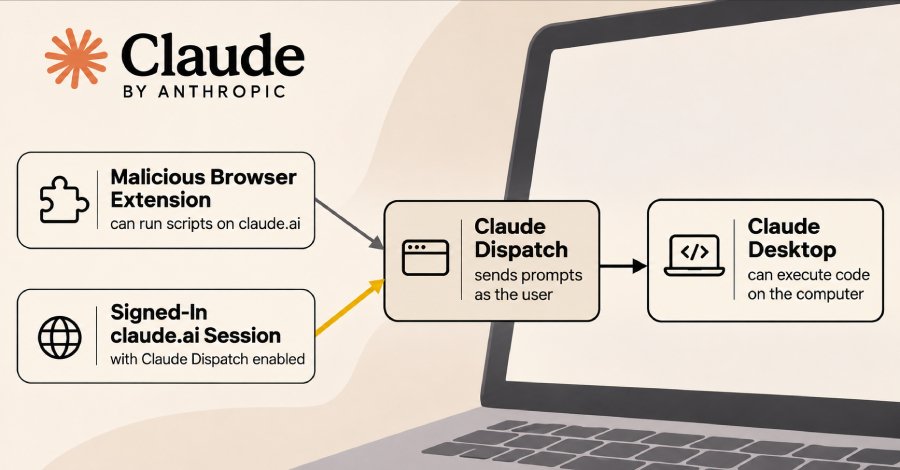
A browser extension able to run scripts on claude.ai could get Claude Desktop to execute code on a user's machine, researchers at endpoint security firm Forever Security demonstrated in a test. The attack relies on Dispatch, a Claude feature for sending tasks from a phone to Claude Desktop, and the flaw remains exploitable, the researchers said this week.
Claude Desktop is an AI agent that can run commands on the computer where it is installed. The researchers found Dispatch also accepted an ordinary signed-in session on claude.ai even though the site showed no link to it, letting an extension on the site send Claude Desktop instructions as if the user had sent them.
According to the researchers, Anthropic told them on October 13 that Dispatch would be retired, targeting the end of October. The Dispatch help page, last updated late last week, does not mention a retirement; it says Dispatch is closed to new users and that existing users on some Pro, Max and Ultra plans "can keep using it for now."
The attack requires two things, per a technical write-up by Forever Security researcher Gal Weizman: an extension that can run scripts on claude.ai, and a person signed in to both claude.ai and Claude Desktop with Dispatch enabled. The extension could be malicious, a legitimate one hit by a compromised update, or a legitimate one with a security flaw. Dispatch only works while the computer is awake and the desktop app is open.
In the test, a script on the user's claude.ai page opened Dispatch and sent Claude four prompts as if from the user, asking it to install an npm package. Claude hesitated over the unfamiliar package, but a follow-up message in the user's voice got it to proceed. Claude asks before acting, but the approval prompts appeared in the web page the extension controlled, and the script clicked any "Allow" button every second. Claude then ran a global npm install, and the package's install script opened the Calculator app. No browser exploit was needed. The researchers say the same step could have stolen files or installed a backdoor given Claude's permissions on the computer.
The test ran the browser and Claude Desktop on the same computer, and the researchers report no real attacks. Because Dispatch connects devices, they say the extension could also reach Claude Desktop on a different computer signed in to the same Claude account - a case described but not shown. That reach could link a home computer to a work laptop when someone uses one personal Claude account on both devices with Dispatch on; the researchers have seen personal accounts with cross-device Dispatch enabled on work computers at their customers.
The researchers reported the flaw to Anthropic on May 14. The company accepted it as valid on May 19 but closed the report as a duplicate of an issue it had already found internally, according to the researchers. "Anthropic is retiring Dispatch, but not the design behind it," the researchers wrote, adding that two other Claude features, Claude Code Remote Control and Claude Cowork sessions, let extensions carry out the same attack. Their write-up does not include a test of those features, and a follow-up post is planned.
In Claude Desktop, Dispatch is part of Cowork and appears in the left-side panel. The Dispatch help page says users should know how to quickly disconnect or revoke access before turning the feature on, but does not explain how. The researchers recommend turning off cross-device Dispatch if it is not needed - or, if it is, reviewing how devices are paired, approved and removed; treating browser extensions like other software by checking permissions, controlling installations and reviewing updates that grant more access; and monitoring what AI agents do on the computer, including unexpected package installations, setting changes, access to credentials and external connections.
Source: The Hackers News
Ready to Modernize Your Business?
Get your AI automation roadmap in minutes, not months.
Analyze Your Workflows →