Invoice Data Extraction With a Local LLM
Reading the invoice is half the job. This guide covers the schema, the arithmetic checks on totals and tax, purchase order matching and a review queue that only sees real exceptions.
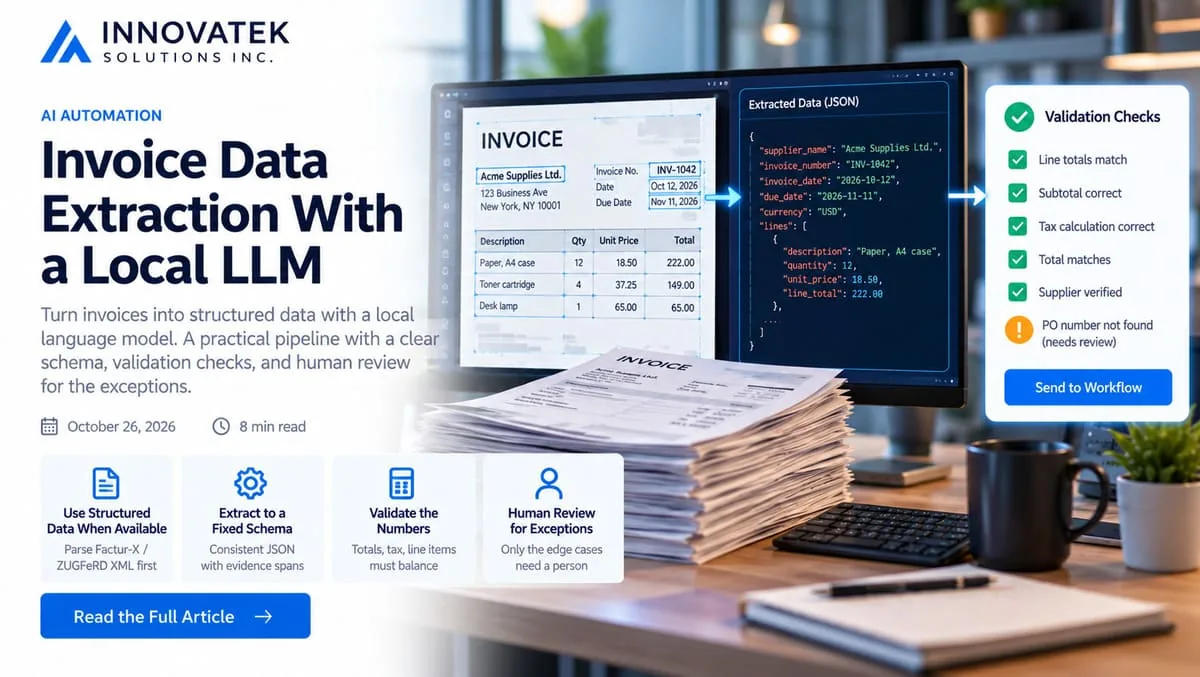
An invoice for 471.97 that a model reads as 477.97 looks perfect in a database: right supplier, right date, a clean number in the total column. Invoice data extraction with a local LLM is easy to get running and hard to trust, because the model fills every field with something plausible whether it read it correctly or not. The value of the pipeline sits in what happens after the model answers: a fixed schema, arithmetic that has to balance, a match against what was actually ordered, and a short queue of exceptions for a person.
This article starts where text already exists. Getting that text out of scans and photos, and choosing between classic OCR engines and vision models, is covered in on-premise OCR and document extraction.
Check for structured data before asking a model anything
Some invoices already carry their fields in machine-readable form. Factur-X, which its publisher describes as technically identical to the German ZUGFeRD format (versions 1.09.2 and 2.5.2 at the time of writing), pairs a readable PDF/A-3 invoice with an XML data file conforming to the European EN 16931 e-invoicing standard. The Factur-X specification page lists five profiles, from MINIMUM (document-level data only) to EXTENDED. MINIMUM and BASIC WL carry no line items; BASIC is the first profile that does.
If a PDF has that attachment, parse the XML and skip the model. The model should only see documents where structure has to be inferred.
Start with the schema, not the prompt
The model's job is narrow: read text and fill a record. Define that record first, in the form downstream code needs.
| Field | Type | Notes |
|---|---|---|
| supplier_name | string | Matched to the vendor master later |
| supplier_tax_id | string or null | VAT number, EIN or similar |
| invoice_number | string | Kept exactly as printed |
| invoice_date, due_date | date or null | ISO format |
| currency | string | Three-letter code |
| po_number | string or null | Often in a reference box or footer |
| lines | list | description, quantity, unit_price, line_total, tax_rate |
| charges | list | Freight, discounts, surcharges, each with amount and sign |
| subtotal, tax_total, total | string | Copied as printed, parsed in code |
| evidence | object | For each header field, the short text span it came from |
Four design choices matter most:
- Amounts as printed, parsed in code. Ask the model to copy
1.284,50or1,284.50exactly. Converting locale formats is deterministic work, and code does it better than a model guessing which separator is decimal. - Null is allowed. A schema that requires
po_numbergets a PO number every time, invented if necessary. Nullable fields let the model say "not on this page". - An evidence span per field. Requiring the source text next to each value makes the later confidence check possible.
- Charges as their own list. Without a place for freight and discounts, the model drops them or folds them into a line, and totals stop adding up.
Most local servers can force output to match a JSON schema. Ollama takes the schema in its format parameter and its documentation suggests a temperature of 0 for predictable output. The llama.cpp server accepts a json_schema on its completion endpoint. Server flags, retry handling and schema shapes that models fill well are covered in getting reliable JSON out of a local LLM. Constrained decoding guarantees valid JSON. It does not guarantee a correct number, which is the next section's job.
Validation arithmetic: make the numbers prove themselves
An invoice is a small system of equations. Every printed number is checked against at least one other, so a single misread digit almost always breaks something. Take this illustrative three-line invoice with an 8.25% sales tax:
| Line | Qty | Unit price | Line total |
|---|---|---|---|
| Paper, A4 case | 12 | 18.50 | 222.00 |
| Toner cartridge | 4 | 37.25 | 149.00 |
| Desk lamp | 1 | 65.00 | 65.00 |
The checks, in order:
- Each line. Quantity x unit price = line total. 12 x 18.50 = 222.00, 4 x 37.25 = 149.00, 1 x 65.00 = 65.00.
- Lines to subtotal. 222.00 + 149.00 + 65.00 = 436.00. Line totals plus any charges (freight added, discounts subtracted) must equal the printed subtotal; this invoice has none.
- Tax. 436.00 x 0.0825 = 35.97. Printed tax should match within a tolerance.
- Total. 436.00 + 35.97 = 471.97.
Now the failure cases. If the model reads the total as 477.97, check 4 fails by exactly 6.00 and the invoice stops. If it reads the toner unit price as 37.52, check 1 fails on that line alone: 4 x 37.52 = 150.08, not 149.00. Line-level checks point the reviewer at the exact cell.
Tolerances and rounding
Tax is where honest invoices fail strict checks. Suppliers round either per line or once on the subtotal. Per line here: 222.00 x 0.0825 = 18.315, rounded to 18.32; 149.00 x 0.0825 = 12.2925, rounded to 12.29; 65.00 x 0.0825 = 5.3625, rounded to 5.36. The sum is 35.97, the same as the invoice-level figure in this case, but on longer invoices the two methods often differ by a cent or two. A sensible tolerance is half a cent per line in either direction, so a 20-line invoice may differ by up to 0.10 on tax and still pass.
Two implementation rules avoid false alarms. Store money as integer cents or a decimal type, never binary floating point, where 0.1 + 0.2 does not equal 0.3 exactly. And check the tax rate itself against the rates valid for that supplier's jurisdiction, so a misread 8.25% that came back as 6.25% fails even if the model also "corrected" the tax amount to fit.
Matching to purchase orders
A balanced invoice can still be wrong for the business. Matching asks whether this is something the company ordered and received. Two-way matching compares invoice to purchase order; three-way matching adds the receiving record, so the check covers what was ordered, what arrived and what was billed. Three-way is the usual standard for physical goods, two-way for services and subscriptions, as accounts payable guides such as Sage's overview of three-way matching describe.
The steps, mostly plain code:
- Find the PO. Normalize the extracted number (strip
PO-, spaces and leading zeros) and look it up. If there is no number, list open POs for that supplier with a remaining value close to the invoice total. - Match lines. Pair invoice lines with PO lines. This is the step where a model helps, because "Toner, black, HY" and "TN-2420 high-yield cartridge" refer to the same item and no exact rule says so. Let the model propose pairs; let code compare the numbers.
- Compare quantities and prices. Using the example: the PO ordered 12 cases of paper at 18.50, the receiving record shows 10 arrived, and the invoice bills 12. That is a quantity exception of 2 x 18.50 = 37.00. A price tolerance, such as 2% or a fixed amount set by finance policy, decides whether a small unit price difference passes.
- Check for duplicates. Same supplier and same invoice number is the obvious test. Same supplier, same total and a date within a few days catches the resubmitted copy with a new number.
The model never decides whether a mismatch is acceptable. It extracts and pairs; the rules that move money stay in code that finance can read.
Confidence scores that mean something
A model's own stated confidence says little about accuracy. Better signals come from outside it:
- Validation result. A field covered by a passing arithmetic or PO check has been confirmed by other numbers on the page.
- Evidence match. The evidence span must appear verbatim in the OCR text and must contain the extracted value. A total whose quoted source does not exist in the document was invented.
- OCR confidence. If the OCR engine reports word-level confidence, carry the lowest score among the words behind each field.
- Token probabilities. The llama.cpp server's
n_probssetting returns the top token probabilities for each generated token, as its server documentation describes. A digit generated at low probability marks a field worth a look. - Run agreement. Extract the same document twice with differently worded prompts. Fields that differ go to review.
Combine these into a status per field rather than one blended score: confirmed (covered by a passing check), unverified (no check covers it, no signal is bad) and review (any signal failed). Whether an unverified due date is acceptable on a small invoice is a threshold for the finance team to set.
The review queue for exceptions
Not every exception belongs to the same person. Route by cause:
| Exception | Goes to | Why |
|---|---|---|
| Field failed extraction checks | AP clerk | Needs the image and a quick correction |
| Price or quantity mismatch with PO | Buyer who raised the PO | Only they know if the change was agreed |
| Possible duplicate | AP lead | Paying twice is expensive to undo |
| New supplier, or changed bank details | Controller | A changed account number is a classic fraud route |
The reviewer should see the flagged field, its image crop, the extracted value and the failed check in words ("lines sum to 436.00, printed subtotal is 463.00").
Measure two numbers from the first month. The touchless rate is invoices that passed every check: if 500 arrive and 410 pass, that is 410 / 500 = 82%. The second is the escaped error rate among invoices that passed, found by the weekly sampling and correction logging described in the human review habits for document extraction. A touchless rate that climbs while escaped errors climb with it means tolerances are too loose, not that the model improved. Month-end backlogs suit an overnight queue, designed as in batch LLM processing.
The working rule: the model fills a record, code checks it, a person approves the exceptions, and only the accounting system posts or pays.
Frequently asked questions
What size of local model is enough for invoice extraction?
Mapping clean OCR text to a fixed schema is a modest task, and small instruction-tuned models often handle single-page invoices. Long multi-page invoices with wrapped line descriptions are harder. Run your own 50 to 100 invoices through two candidate sizes and compare how often the arithmetic checks fail.
Should the model read the image or the OCR text?
Text is easier to validate, because evidence spans can be found in it. A vision model reading the image directly can handle messy tables better but gives no source text to check against. A common compromise is a vision model for reading and the OCR text as the evidence source for confirming values.
Can one pipeline handle invoices in several languages and currencies?
Yes, if the schema stays fixed and parsing happens in code. Labels such as Rechnungsnummer or numero de facture map to the same field, and keeping amounts as printed lets locale rules decide whether a comma is a decimal separator. Test weak languages separately, since error rates vary by language.
Ready to Modernize Your Business?
Get your AI automation roadmap in minutes, not months.
Analyze Your Workflows →