Hybrid AI: Splitting Work Between Local and Cloud Models
A hybrid setup sends sensitive work to a model on your own hardware and everything else to a cloud model. The routing rule, the gateway that enforces it, and the ways it leaks.
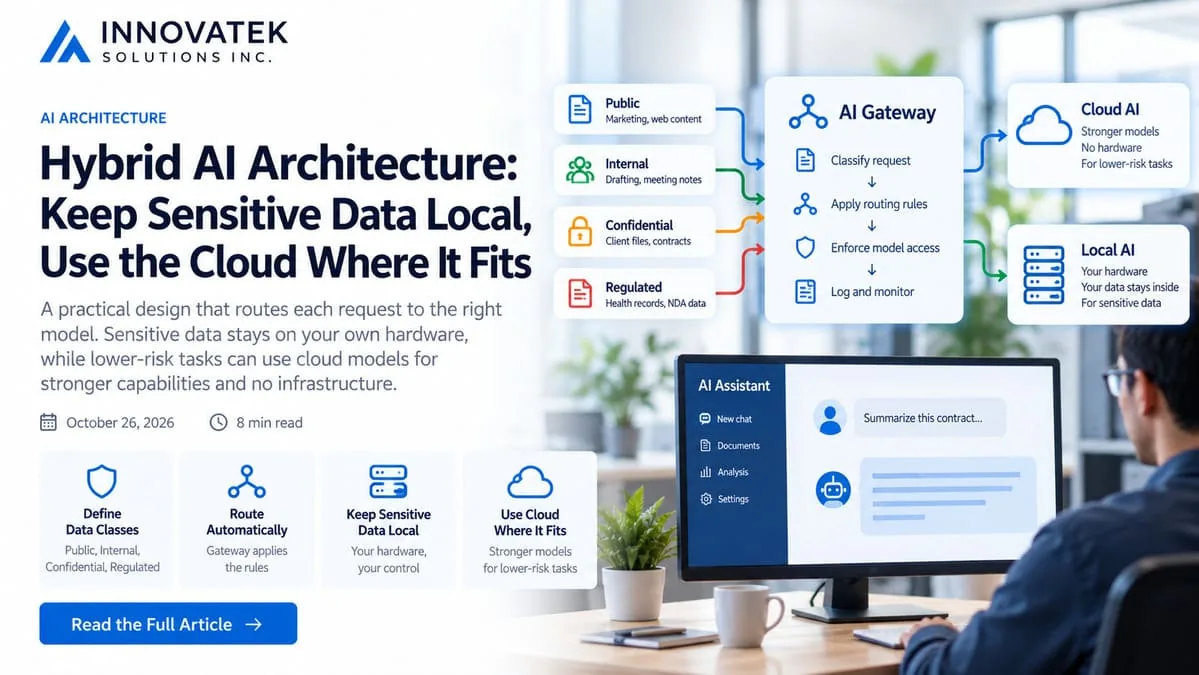
A hybrid AI architecture answers one question for every request: may this text leave the building? If the answer is no, the request goes to a model running on hardware the company controls. If the answer is yes, it may go to a cloud model, which is usually stronger and needs no hardware. Everything else in the design exists to make that answer reliable: a short list of data classes, a rule that maps each class to a route, and a gateway that applies the rule so that no person has to remember it at 5 pm on a Friday.
Start with data classes, not with models
The routing rule should be written before anyone picks a model. Most companies already have an informal version of it in their heads, and four classes are enough for a business of 5 to 500 people.
| Class | Typical content | Route |
|---|---|---|
| Public | Published marketing copy, public documentation, open web pages | Cloud allowed |
| Internal | Generic drafting, code with no secrets, meeting agendas, process notes | Cloud allowed under a business agreement |
| Confidential | Client files, contracts, financials, HR records, source code that is the product | Local only |
| Regulated | Health records, data covered by a client NDA or a statute, export-controlled material | Local only, with logging and access limits |
Two details matter more than the labels.
First, the cloud column assumes a provider whose terms have actually been read. Consumer chat products and paid API tiers often differ on retention and training, and the method for checking is covered in the guide to whether cloud providers train on business data.
Second, there is no fifth class called "confidential, but cleaned up". Redacting a document and then sending it to the cloud is a legitimate technique, yet it is a separate route with its own error rate, discussed below. Treating redacted text as if it were public is the most common way a hybrid design goes wrong.
Classify by source, not by reading the prompt
A gateway can decide the class of a request in two ways: by inspecting the text, or by knowing where the request came from.
Inspection sounds smarter and performs worse. A pattern matcher finds a Social Security number. It does not recognize that a paragraph describing an unannounced acquisition is the most sensitive thing the company holds, because nothing in that paragraph looks like an identifier.
Classifying by source is blunt and dependable. Each application that calls a model is assigned a class once, at setup:
- The contract review tool reads the client document store, so it is Confidential, always.
- The website copy assistant only sees published pages, so it is Public.
- The general staff chat window is the hard case. It can receive anything a person pastes, so it should default to the local model, with the cloud model offered as a deliberate, visible choice.
If the general chat window points at the cloud unless a user remembers to switch, the design relies on every employee classifying data correctly every time. Defaulting to local reverses the risk: a mistake sends harmless text to the slower model instead of sending a client file out of the building.
How a gateway enforces the rule
The gateway is a small service that sits between every application and every model. Applications never hold a cloud provider key and never call the local model server directly. They call the gateway, and the gateway decides.
Because most local runtimes and most gateways speak the same HTTP dialect, this costs little in application code. Repointing an integration is mostly a base URL change, as explained in the article on OpenAI-compatible local APIs.
Open-source gateways exist for this job. LiteLLM is one example: its documentation describes a self-hosted proxy that exposes one OpenAI-format endpoint in front of many providers, with virtual keys that can belong to a user or a team, where each key has its own allowed models, budget and rate limits. The main repository is MIT licensed, with a separate license for its enterprise/ directory, as of October 2026. Whatever the product, four controls matter.
One key per application, with a model allowlist
Each application gets its own gateway key, and each key lists the models it may call. In LiteLLM this is the models parameter when a key is generated. The contract review tool's key lists only the local model. If a developer later edits that tool to request a cloud model, the gateway refuses, because the key was never allowed to reach it. The routing rule now lives in one place instead of in every application's settings.
Provider credentials only at the gateway
The cloud API key exists in exactly one configuration file. Nobody can bypass the gateway from a laptop script, because nobody else has the credential.
An egress rule at the firewall
The network should agree with the gateway. Only the gateway host may open connections to the cloud provider's API; the application servers and the local model server may not. Without this, the allowlist is a convention.
Logs that record the route
Every request should leave a record of which key called, which model answered and whether the answer came from the local or the cloud side. That record is what lets someone prove, six months later, that a class of data never left. The fields worth keeping are listed in the guide to audit logs for internal AI.
Where sensitive text leaks through the safe route
A hybrid design fails quietly. Nothing crashes, the answer looks fine, and the text has gone somewhere it should not. Four leaks account for most of the trouble.
Fallbacks that cross the boundary
Gateways offer fallbacks so a request survives an outage. LiteLLM's reliability documentation describes a fallbacks setting that moves a failed call to another model group, a context_window_fallbacks setting for requests that exceed a model's context, and default_fallbacks for any model group without a specific entry. Its quick-start example moves traffic from one cloud deployment to another, and the same page shows fallbacks across providers.
Now picture the local server restarting during a model swap, or a 90-page contract overflowing the local model's context. If the fallback target is a cloud model with a larger window, the gateway does precisely what it was told and sends the contract out. The rule: a fallback may only point to a model in the same data class. For local-only keys, the correct behavior on failure is an error message, not a rescue.
Redaction that misses
Stripping identifiers before a cloud call is useful, and it is statistical. Microsoft's Presidio, a common open-source detector, states in its README that "there is no guarantee that Presidio will find all sensitive information."
The arithmetic shows why this matters. Take an illustrative 40-person firm that sends 400 requests a day through a redact-then-cloud route, each containing at least one client identifier. Suppose the redactor catches 95 percent of them, a figure chosen for the example, not a measured one.
- 400 requests x 5 percent missed = 20 requests a day with an identifier intact
- 20 x 21 working days = 420 a month
Whether 420 is tolerable depends on the class. For Internal data it may be fine. For Regulated data it is not, which is why that class stays local regardless of how good the redactor looks. Measuring the real miss rate on real documents is covered in PII redaction before text reaches a model.
A related trap is the masking mode. LiteLLM's Presidio guardrail has a logging_only mode that masks what is written to logs while leaving the actual request to the model unchanged. A team that enables it and believes the cloud call is being scrubbed has protected the wrong copy.
Context added after the decision
A user asks the cloud-routed assistant a harmless question. A retrieval step then attaches three passages from the internal document store, or the application appends the conversation history, which includes a client letter pasted ten minutes earlier. The question was Public. The request is Confidential.
Classification has to apply to the final assembled prompt, and a conversation should carry the highest class of anything that has entered it. Once a chat has touched a confidential document, it stays on the local model until it ends.
Logs that leave the building
The gateway keeps prompts so that problems can be debugged. If those logs are shipped to a hosted monitoring service, every local-only prompt now sits with a third party that was never part of the routing rule. Log destinations need a data class just as models do.
Testing the split before staff depend on it
A routing rule that has never been attacked is a hope. Four tests take an afternoon and should be repeated after every gateway change.
- Plant a canary. Put a unique made-up string, such as a fake account number, in a confidential test document. Run the normal workflows, then search the gateway's cloud-side logs for the string. It should appear nowhere.
- Kill the local model. Stop the local server and send a request with a local-only key. The expected result is an error. An answer means a fallback crossed the boundary.
- Overflow the context. Send a local-only request longer than the local model's context setting and confirm that it fails or is truncated locally instead of being promoted to a bigger cloud model.
- Ask for the wrong model. Use a local-only key to request the cloud model by name and confirm the gateway refuses.
If any of the four fails, fix the gateway configuration before adding another application to the cloud route.
Frequently asked questions
Should staff be allowed to choose the route themselves?
Only in one direction. Letting a user move a conversation from cloud to local is harmless. Moving from local to cloud should be blocked for applications tied to confidential sources, and for a general chat window it should require starting a fresh conversation so earlier content does not travel along.
What happens to hybrid routing when there is no internet connection?
Local-only applications keep working, because nothing in their path leaves the network. Cloud-routed applications fail, unless they are configured to fall back to the local model, which is the one fallback direction that never weakens the data rule. Answers may be less capable during the outage, and the log should show which model responded.
Is a hybrid design acceptable for regulated data such as health records?
The architecture itself is neutral: regulated data is assigned to the local-only class and never reaches the cloud route. Whether that satisfies a specific law or contract depends on the obligations involved, including access control and logging on the local side. This is general information and not legal advice.
Ready to Modernize Your Business?
Get your AI automation roadmap in minutes, not months.
Analyze Your Workflows →